


PAM8403 Amplifier Circuit Diagram: Wiring Without Ground Shorts

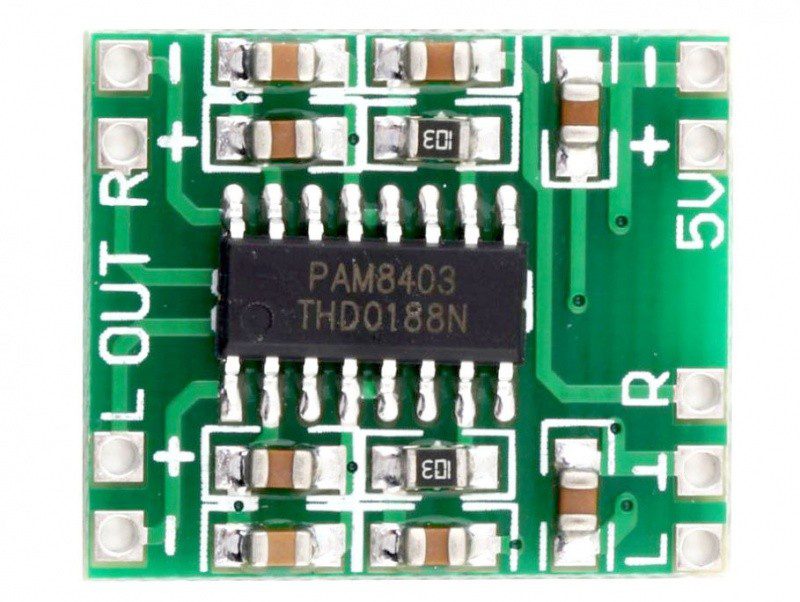
A PAM8403 amplifier circuit diagram must keep input ground, supply ground and bridge speaker terminals conceptually separate. This wiring guide explains a small stereo-board bring-up and common faults. Use the actual board’s labels and schematic; it is not a replacement PCB layout for every PAM8403 module.
Map the three connection groups

Identify supply VCC/GND, line-level left/right input with its reference, and the two output pairs L+/L− and R+/R−. Verify polarity with power removed. Terminal placement varies, and an unlabelled image from another revision is not a reliable wiring map. Inspect solder bridges and avoid loose strands around adjacent pads.
Connect each speaker across one output pair
One speaker goes between L+ and L−; the other goes between R+ and R−. Do not join the negative output terminals or connect either to chassis/supply ground. Do not bridge the two amplifier channels to seek extra power. Bridge-tied operation is already part of the amplifier architecture and must be respected.
Use a stable supported supply
For a typical documented five-volt board, use a regulated source within its limits and check the voltage under audio load. The IC recommended operating maximum is 5.5 V, not the voltage of a convenient 12 V audio adapter. Disconnect power before changing speakers or input wiring. Do not rely on protection features as a substitute for correct connections.
Route the input for a quiet first test
Use a suitable low-level audio source and its documented ground reference. Keep input leads short and away from the power/output wiring. Start with volume low. A floating input can pick up interference, while excessive source amplitude can produce distortion. Do not assume every noise problem needs a bigger speaker or a new amplifier chip.
Bring up one channel and diagnose by symptom
Test a known input and one suitable speaker at low level, then repeat with the other channel. No sound calls for supply, mute/control state, input routing and speaker checks. Distortion that rises with volume suggests clipping, inadequate supply or an unsuitable load. Buzz tied to a charger or cable arrangement calls for grounding and supply-noise investigation.
Measure bridge outputs safely
A conventional earth-referenced oscilloscope ground clip must not be attached to a driven speaker terminal. Use a correctly rated differential measurement arrangement and appropriate competence. Similarly, a common-ground audio test input may short the output. If the available instrument setup is unsuitable, limit the test rather than improvising a dangerous ground connection.
Newest in the store


Check the finished installation
Secure the board, insulate exposed terminals and provide strain relief for power and speaker leads. Recheck operation after fitting the enclosure because cable routing and nearby electronics can change noise. Record supply, speaker impedance and source level with any performance observation. Do not report a listening impression as a measured distortion or efficiency result.
Relevant Epro listing
Product information and prices were checked on 19 October 2026. This is a current snapshot, not a historical price associated with the publication timestamp. Stock, accessories and checkout prices can change. Listing claims are not independent performance or authenticity certifications.
| Product | Checked price | Stock |
|---|---|---|
| PAM8403 DC 5V Class D Mini Digital Amplifier Board Module in Pakistan | PKR 70 | In stock |
| PAM8403 Mini 5V 2 Channel Digital USB Amplifier Board GF1002 in Pakistan | PKR 140 | In stock |
Frequently asked questions
Can I ground an oscilloscope clip to L−?
Not with a normal earth-referenced setup. L− is a driven bridge terminal; use an appropriate differential measurement method.
Why does louder audio become distorted?
Investigate clipping, supply droop, input amplitude and speaker load rather than assuming the wattage label guarantees clean output.
Related Epro reading
Review breadboard connections before assembling a prototype. For controller expansion, the Mega 2560 pin guide explains why pin names and electrical limits must be checked together.
Technical references and test limitations
This guide uses the documentation linked below. The procedures are for a controlled, low-voltage learning setup; no independent hands-on test of the particular seller board is claimed. Record the actual part markings, wiring and firmware version before drawing conclusions from a test.